Deploying apps with CDK
AWS Cloud Development Kit (CDK) is a code framework for deploying apps through AWS CloudFormation. The main reason I like CDK is that you define your infrastructure using code, which means it’s easy to connect things and generate settings programmatically.
Pre-requisites
Before creating any apps, we need a URL to deploy them to. I have a Route 53 hosted zone for which I’ve pre-generated a single, catch-all SSL certificate. You can generate a new certificate for each application if you prefer.
Lambda
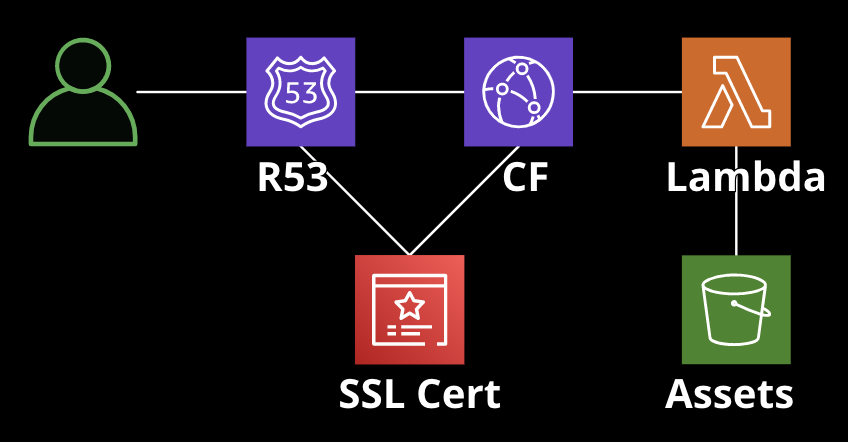
- Code is deployed as the infrastructure is deployed
- Uses a public web URL and a CloudFront distribution for public access
- Pros: very cheap for low volume, simple to deploy and manage
- Cons: not as cost-efficient at scale, app size limits, cold start
The app will create the following:
- S3 bucket containing assets
- AWS Lambda function running node
- CloudFront distribution for caching
- Route53 A-Record for a domain
S3 bucket
For storing assets, we create a bucket and deployment so we can easily sync files from our source code into the bucket:
// from the Stack constructor
declare const context: Construct;

// props when creating the app
const appDomainName = 'jackbliss.co.uk'; // base URL
const id: String = 'Homepage';

// can be hard-coded or a prop when creating the stack
const sources = [Source.asset('./bucket')];

const bucket = new s3.Bucket(context, `${id}_S3`, {
  bucketName: `${appDomainName}.assets`,
  blockPublicAccess: s3.BlockPublicAccess.BLOCK_ALL,
  enforceSSL: true,
  removalPolicy: RemovalPolicy.DESTROY,
  autoDeleteObjects: true,
});

const deployment = new s3_deployment.BucketDeployment(
  context,
  `${id}_BucketDeployment`,
  {
    destinationBucket: bucket,
    sources,
    prune: false,
  },
);
The lambda function itself
Next, we add a Lambda function to handle requests. The function needs permission to access the asset bucket, as well as a URL so it can be publically called:
const entry = './src/server/lambda.ts';

const nodejsFunction = new lambda_nodejs.NodejsFunction(
  context,
  `${id}_Lambda`,
  {
    functionName: `${id}_HttpService`,
    handler: 'handler',
    entry,
    memorySize: 1024,
    runtime: aws_lambda.Runtime.NODEJS_18_X,
    logRetention: 14, // days
    timeout: Duration.seconds(300),
    bundling: {
      minify: true,
      externalModules: ['aws-sdk'], // these are already available in the Lambda environment
      loader: {
        '.html': 'text', // for convenience
      },
    },
    environment: {
      NODE_ENV: 'production',
      BUCKET: bucket.bucketName,
    },
  },
);

// give it a public URL
const functionUrl = nodejsFunction.addFunctionUrl({
  authType: aws_lambda.FunctionUrlAuthType.NONE,
});

// give it access to the bucket
nodejsFunction.addToRolePolicy(
  new iam.PolicyStatement({
    actions: ['s3:GetObject', 's3:PutObject'],
    resources: [bucket.bucketArn + '/*'],
  }),
);
nodejsFunction.addToRolePolicy(
  new iam.PolicyStatement({
    actions: ['s3:ListBucket'],
    resources: [bucket.bucketArn],
  }),
);
CloudFront distribution
Now that we have something to cache, we can create the distribution.
// provided when creating the stack
delcare const certificateArn: string;

// get domainName required by cf origin
const functionApiUrl = Fn.select(1, Fn.split('://', functionUrl.url));
const functionDomainName = Fn.select(0, Fn.split('/', functionApiUrl));
const origin = new origins.HttpOrigin(functionDomainName);

const distribution = new cloudfront.Distribution(
  scope,
  `${id}_Cloudfront`,
  {
    comment: `${stackName} ${id} cache behaviour`,
    defaultBehavior: {
      origin,
      allowedMethods: cloudfront.AllowedMethods.ALLOW_ALL,
      cachePolicy: new cloudfront.CachePolicy(
        scope,
        `${id}_CachePolicy`,
        {
          defaultTtl: Duration.seconds(10), // can adjust these as desired
          minTtl: Duration.seconds(0),
          maxTtl: Duration.hours(1),
        },
      ),
    },
    domainNames: [appDomainName],
    certificate: certificatemanager.Certificate.fromCertificateArn(
      scope,
      `${id}_CloudFront_CertificateReference`,
      certificateArn,
    ),
  },
);
Route53
Finally, we need to create a DNS record so that the app can be accessed by a domain name:
// provided when creating the stack
declare const hostedZoneId: string;
declare const zoneName: string;

new route53.ARecord(context, `${id}_CDN_ARecord`, {
  zone: route53.HostedZone.fromHostedZoneAttributes(
    context,
    `${id}_R53_HostedZone`,
    {
      hostedZoneId,
      zoneName,
    },
  ),
  recordName: appDomainName,
  target: route53.RecordTarget.fromAlias(
    new route53Targets.CloudFrontTarget(distribution),
  ),
});
Limitations
The lambda function has a public URL, which means it can be called by anyone, and bypass the CloudFront distribution. This is a security risk, but it’s also a cost risk. If someone were to call the function repeatedly, it could rack up a lot of costs. One way to address this is to restrict access to the function URL to users with the correct IAM_ROLE, and then use a separate lambda@edge function to sign requests to the Lambda that come through CloudFront. This article has more details.